

XK0-005 Exam Questions - Online Test
XK0-005 Premium VCE File

150 Lectures, 20 Hours

Master the XK0-005 CompTIA Linux+ Certification Exam content and be ready for exam day success quickly with this Actualtests XK0-005 exam answers. We guarantee it!We make it a reality and give you real XK0-005 questions in our CompTIA XK0-005 braindumps.Latest 100% VALID CompTIA XK0-005 Exam Questions Dumps at below page. You can use our CompTIA XK0-005 braindumps and pass your exam.
Also have XK0-005 free dumps questions for you:
NEW QUESTION 1
An administrator thinks that a package was installed using a snap. Which of the following commands can the administrator use to verify this information?
- A. snap list
- B. snap find
- C. snap install
- D. snap try
Answer: A
Explanation:
The snap list command is used to display the installed snaps on the system1. Snaps are self-contained software packages that can be installed and updated across different Linux distributions2. The snap list command shows the name, version, revision, developer and notes of each snap1.
The snap find command is used to search for snaps in the Snap Store, which is an online repository of snaps2. The snap install command is used to install snaps from the Snap Store or from a local file2. The snap try command is used to test a snap without installing it, by mounting a directory that contains the snap files2. These commands are not useful for verifying if a package was installed using a snap.
NEW QUESTION 2
A systems engineer has deployed a new application server, but the server cannot communicate with the backend database hostname. The engineer confirms that the application server can ping the database server's IP address. Which of the following is the most likely cause of the issue?
- A. Incorrect DNS servers
- B. Unreachable default gateway
- C. Missing route configuration
- D. Misconfigured subnet mask
Answer: A
Explanation:
This is because the application server can ping the database server’s IP address, but not its hostname, which suggests that the DNS resolution is not working properly. DNS servers are responsible for translating hostnames into IP addresses, and vice versa. If the application server has incorrect or unreachable DNS servers configured, it will not be able to resolve the hostname of the database server and communicate with it.
To troubleshoot this issue, the systems engineer should check the DNS configuration on the application server, which is usually stored in the /etc/resolv.conf file. This file should contain valid nameserver entries that point to the DNS servers that can resolve the database server’s hostname. For example, a typical /etc/resolv.conf file may look like this: nameserver 8.8.8.8 nameserver 8.8.4.4
These are the IP addresses of Google’s public DNS servers, which can be used as a fallback option if the default DNS servers are not working.
Alternatively, the systems engineer can use the nslookup or dig commands to test the DNS resolution of the database server’s hostname from the application server. These commands will query a specified DNS server and return the IP address of the hostname, or an error message if the resolution fails. For example, to query Google’s public DNS server for the IP address of comptia.org, the command would be:
nslookup comptia.org 8.8.8.8 or dig comptia.org @8.8.8.8
NEW QUESTION 3
Which of the following would significantly help to reduce data loss if more than one drive fails at the same time?
- A. Server clustering
- B. Load balancing
- C. RAID
- D. VDI
Answer: C
Explanation:
RAID stands for Redundant Array of Independent Disks, which is a technology that combines multiple physical disks into a logical unit that provides improved performance, reliability, or both. RAID can significantly help to reduce data loss if more than one drive fails at the same time, depending on the RAID level used. For example, RAID 1 (mirroring) duplicates the data on two or more disks, so that if one disk fails, the data can be recovered from another disk. RAID 5 (striping with parity) distributes the data and parity information across three or more disks, so that if one disk fails, the data can be reconstructed from the remaining disks. RAID 6 (striping with double parity) extends RAID 5 by adding another parity block, so that if two disks fail, the data can still be recovered from the remaining disks. References: [What is RAID?]
NEW QUESTION 4
An administrator recently updated the BIND software package and would like to review the default configuration that shipped with this version. Which of the following files should the administrator review?
- A. /etc/named.conf.rpmnew
- B. /etc/named.conf.rpmsave
- C. /etc/named.conf
- D. /etc/bind/bind.conf
Answer: A
Explanation:
After installing a new version of a package that includes a configuration file that already exists on the system, such as /etc/httpd/conf/httpd.conf, RPM will create a new file with the .rpmnew extension instead of overwriting the existing file. This allows the administrator to review the default configuration that shipped with this version and compare it with the current configuration before deciding whether to merge or replace the files. The /etc/named.conf.rpmsave file is created by RPM when a package is uninstalled and it contains a configuration file that was modified by the administrator. This allows the administrator to restore the configuration file if needed. The /etc/named.conf file is the main configuration file for the BIND name server, not the httpd web server. The /etc/bind/bind.conf file does not exist by default in Linux systems. References: CompTIA Linux+ (XK0-005) Certification Study Guide, Chapter 19: Managing Packages and Software, page 561.
NEW QUESTION 5
The development team created a new branch with code changes that a Linux administrator needs to pull from the remote repository. When the administrator looks for the branch in Git, the branch in question is not visible. Which of the following commands should the Linux administrator run to refresh the branch information?
- A. git fetch
- B. git checkout
- C. git clone
- D. git branch
Answer: A
Explanation:
The git fetch command downloads commits, files, and refs from a remote repository into the local one. It also updates the remote-tracking branches, which are references to the state of the remote branches. By running git fetch, the administrator can see the new branch created by the development team and then use git checkout to switch to it12. References: 1: Git - git-fetch Documentation 2: Git Fetch | Atlassian Git Tutorial
NEW QUESTION 6
A Linux administrator wants to prevent the httpd web service from being started both manually and automatically on a server. Which of the following should the administrator use to accomplish this task?
- A. systemctl mask httpd
- B. systemctl disable httpd
- C. systemctl stop httpd
- D. systemctl reload httpd
Answer: A
Explanation:
The best command to use to prevent the httpd web service from being started both manually and automatically on a server is A. systemctl mask httpd. This command will create a symbolic link from the httpd service unit file to /dev/null, which will make the service impossible to start or enable. This is different from systemctl disable httpd, which will only prevent the service from starting automatically on boot, but not manually. The other commands are either not relevant or not sufficient for this task. For example:
✑ C. systemctl stop httpd will only stop the service if it is currently running, but it will not prevent it from being started again.
✑ D. systemctl reload httpd will only reload the configuration files of the service, but it
will not stop or disable it.
NEW QUESTION 7
Developers have requested implementation of a persistent, static route on the application server. Packets sent over the interface eth0 to 10.0.213.5/32 should be routed via 10.0.5.1. Which of the following commands should the administrator run to achieve this goal?
- A. route -i etho -p add 10.0.213.5 10.0.5.1
- B. route modify eth0 +ipv4.routes "10.0.213.5/32 10.0.5.1"
- C. echo "10.0.213.5 10.0.5.1 eth0" > /proc/net/route
- D. ip route add 10.0.213.5/32 via 10.0.5.1 dev eth0
Answer: D
Explanation:
The command ip route add 10.0.213.5/32 via 10.0.5.1 dev eth0 adds a static route to the routing table that sends packets destined for 10.0.213.5/32 (a single host) through the gateway 10.0.5.1 on the interface eth0. This is the correct way to achieve the goal. The other options are incorrect because they either use the wrong syntax (route -i etho -p add), the wrong command (route modify), or the wrong file
(/proc/net/route). References: CompTIA Linux+ (XK0-005) Certification Study Guide, Chapter 12: Managing Network Connections, page 379.
NEW QUESTION 8
A systems administrator is tasked with creating a cloud-based server with a public IP address.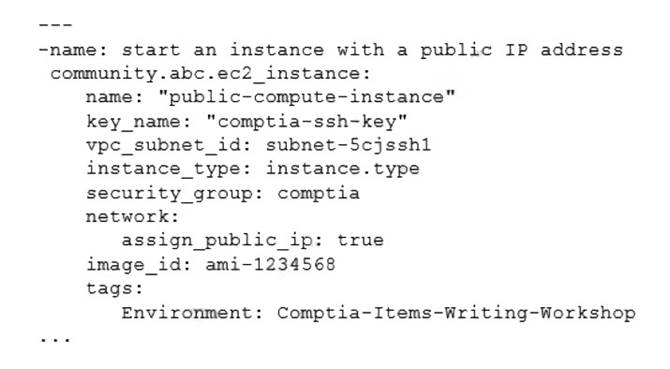
Which of the following technologies did the systems administrator use to complete this task?
- A. Puppet
- B. Git
- C. Ansible
- D. Terraform
Answer: D
Explanation:
The systems administrator used Terraform to create a cloud-based server with a public IP address. Terraform is a tool for building, changing, and versioning infrastructure as code. Terraform can create and manage resources on different cloud platforms, such as AWS, Azure, or Google Cloud. Terraform uses a declarative syntax to describe the desired state of the infrastructure and applies the changes accordingly. Terraform can also assign a public IP address to a cloud server by using the appropriate resource attributes. This is the correct technology that the systems administrator used to complete the task. The other options are incorrect because they are either not designed for creating cloud servers (Puppet or Git) or not capable of assigning public IP addresses (Ansible). References: CompTIA Linux+ (XK0-005) Certification Study Guide, Chapter 19: Managing Cloud and Virtualization Technologies, page 559.
NEW QUESTION 9
A Linux user reported the following error after trying to connect to the system remotely: ssh: connect to host 10.0.1.10 port 22: Resource temporarily unavailable
The Linux systems administrator executed the following commands in the Linux system while trying to diagnose this issue: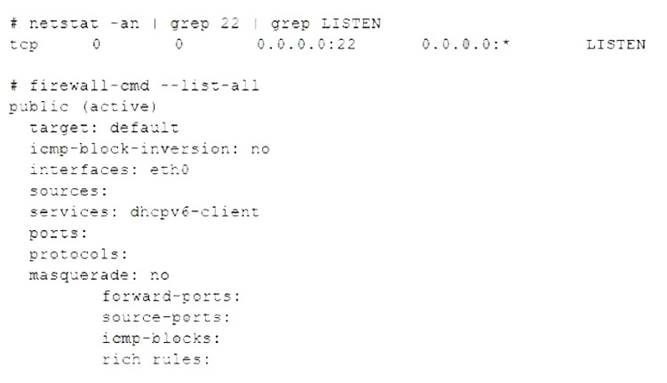
Which of the following commands will resolve this issue?
- A. firewall-cmd --zone=public --permanent --add-service=22
- B. systemct1 enable firewalld; systemct1 restart firewalld
- C. firewall-cmd --zone=public --permanent --add-service=ssh
- D. firewall-cmd --zone=public --permanent --add-port=22/udp
Answer: C
Explanation:
The firewall-cmd --zone=public --permanent --add-service=ssh command will resolve the issue by allowing SSH connections on port 22 in the public zone of the firewalld service. This command will add the ssh service to the permanent configuration of the public zone, which means it will persist after a reboot or a reload of the firewalld service. The firewall-cmd --zone=public --permanent --add-service=22 command is invalid, as 22 is not a valid service name. The systemct1 enable firewalld; systemct1 restart firewalld command will enable and restart the firewalld service, but it will not change the firewall rules. The firewall-cmd --zone=public --permanent --add-port=22/udp command will allow UDP traffic on port 22 in the public zone, but SSH uses TCP, not UDP. References: CompTIA Linux+ (XK0-005) Certification Study Guide, Chapter 18: Securing Linux Systems, page 543.
NEW QUESTION 10
Some servers in an organization have been compromised. Users are unable to access to the organization’s web page and other services. While reviewing the system log, a systems administrator notices messages from the kernel regarding firewall rules: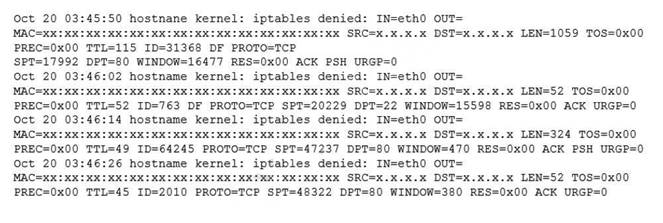
Which of the following commands will remediate and help resolve the issue?
- A.

- B.

- C.

- D.

Answer: A
Explanation:
The command iptables -F will remediate and help resolve the issue. The issue is caused by the firewall rules that block the access to the organization’s web page and other services. The output of dmesg | grep firewall shows that the kernel has dropped packets from the source IP address 192.168.1.100 to the destination port 80, which is the default port for HTTP. The command iptables -F will flush all the firewall rules and allow the traffic to pass through. This command will resolve the issue and restore the access to the web page and other services. The other options are incorrect because they either do not affect the firewall rules (ip route flush or ip addr flush) or do not exist (iptables - R). References: CompTIA Linux+ (XK0-005) Certification Study Guide, Chapter 18: Securing Linux Systems, page 543.
NEW QUESTION 11
A systems administrator is investigating a service that is not starting up. Given the following information:
Which of the following systemd commands should the administrator use in order to obtain more details about the failing service?
- A. systemct1 analyze network
- B. systemct1 info network
- C. sysctl -a network
- D. journalctl -xu network
Answer: D
Explanation:
The systemd is a system and service manager for Linux systems that provides a standard way to control and monitor system services. The systemd uses various commands and tools to manage and troubleshoot system services, such as systemct1, sysctl, and journalctl. The systemct1 command is used to start, stop, enable, disable, restart, reload, status, and list system services. The sysctl command is used to configure kernel parameters at runtime. The journalctl command is used to view and filter the logs of system services.
To investigate a service that is not starting up, the administrator can use the journalctl command with the -xu option. The -x option enables verbose output that includes explanatory text and priority information. The -u option filters the output by a specific unit name, such as network.service. Therefore, the command journalctl -xu network will show detailed logs of the network service, which can help identify the cause of the failure. The statement D is correct.
The statements A, B, and C are incorrect because they do not provide more details about the failing service. The systemct1 analyze network command does not exist.
The systemct1 info network command shows basic information about the network unit, such as description, load state, active state, sub state, and main PID. The sysctl -a network command shows all kernel parameters related to network settingsR. eferences: [How to Use Systemd to Manage System Services]
NEW QUESTION 12
A systems technician is working on deploying several microservices to various RPM-based systems, some of which could run up to two hours. Which of the following commands will allow the technician to execute those services and continue deploying other microservices within the same terminal section?
- A. gedit & disown
- B. kill 9 %1
- C. fg %1
- D. bg %1 job name
Answer: D
Explanation:
The command that will allow the technician to execute the services and continue deploying other microservices within the same terminal session is bg %1 job name. This command will send the job with ID 1 and name job name to the background, where it will run without occupying the terminal. The other options are incorrect because:
✑ gedit & disown will launch a graphical text editor in the background and detach it from the terminal, but it will not execute any service.
✑ kill 9 %1 will terminate the job with ID 1 using a SIGKILL signal, which cannot be ignored or handled by the process.
✑ fg %1 will bring the job with ID 1 to the foreground, where it will occupy the terminal until it finishes or is stopped. References: CompTIA Linux+ Study Guide, Fourth Edition, page 181-182.
NEW QUESTION 13
Which of the following will prevent non-root SSH access to a Linux server?
- A. Creating the /etc/nologin file
- B. Creating the /etc/nologin.allow file containing only a single line root
- C. Creating the /etc/nologin/login.deny file containing a single line +all
- D. Ensuring that /etc/pam.d/sshd includes account sufficient pam_nologin.so
Answer: A
Explanation:
This file prevents any non-root user from logging in to the system, regardless of the authentication method. The contents of the file are displayed to the user before the login is terminated. This can be useful for system maintenance or security reasons12.
References: 1: Creating the /etc/nologin File - Oracle 2: How to Restrict Log In Capabilities of Users on Ubuntu
NEW QUESTION 14
A cloud engineer wants to delete all unused networks that are not referenced by any container. Which of the following commands will achieve this goal?
- A. docker network erase
- B. docker network clear
- C. docker network prune
- D. docker network rm
Answer: C
Explanation:
The docker command is used to manage Docker containers, images, networks, volumes, and other resources on a Linux system. Docker is a platform that allows users to run applications in isolated environments called containers. Docker also provides networking features that allow users to create and manage networks for containers.
To delete all unused networks that are not referenced by any container, the cloud engineer can use the docker network prune command. This command will remove all networks that have no containers connected to them. The statement C is correct.
The statements A, B, and D are incorrect because they do not delete all unused networks.
The docker network erase and docker network clear commands do not exist. The docker network rm command deletes a specific network by name or ID, but not all unused networks. References: [How to Manage Docker Networks]
NEW QUESTION 15
Which of the following commands will display the operating system?
- A. uname -n
- B. uname -s
- C. uname -o
- D. uname -m
Answer: C
Explanation:
The command that will display the operating system is uname -o. This command uses the uname tool, which is used to print system information such as the kernel name, version, release, machine, and processor. The -o option stands for operating system, and prints the name of the operating system implementation (usually GNU/Linux). The other options are not correct commands for displaying the operating system. The uname -n command will display the network node hostname of the system. The uname -s command will display the kernel name of the system. The uname -m command will display the machine hardware name of the system. References: CompTIA Linux+ (XK0-005) Certification Study Guide, Chapter 1: Exploring Linux Command-Line Tools; uname(1) - Linux manual page
NEW QUESTION 16
......
P.S. Easily pass XK0-005 Exam with 389 Q&As Certleader Dumps & pdf Version, Welcome to Download the Newest Certleader XK0-005 Dumps: https://www.certleader.com/XK0-005-dumps.html (389 New Questions)
- [2021-New] CompTIA 220-902 Dumps With Update Exam Questions (121-130)
- [2021-New] CompTIA SK0-004 Dumps With Update Exam Questions (41-50)
- [2021-New] CompTIA CAS-002 Dumps With Update Exam Questions (4-13)
- Update CompTIA Advanced Security Practitioner (CASP) CAS-003 Samples
- Top Tips Of Improve PT0-002 Preparation Labs
- [2021-New] CompTIA SK0-004 Dumps With Update Exam Questions (131-136)
- [2021-New] CompTIA 220-901 Dumps With Update Exam Questions (131-140)
- The Secret Of CompTIA N10-009 Brain Dumps
- [2021-New] CompTIA SY0-401 Dumps With Update Exam Questions (101-110)
- [2021-New] CompTIA LX0-104 Dumps With Update Exam Questions (61-70)