

XK0-005 Exam Questions - Online Test
XK0-005 Premium VCE File

150 Lectures, 20 Hours

Actual of XK0-005 exam engine materials and testing bible for CompTIA certification for examinee, Real Success Guaranteed with Updated XK0-005 pdf dumps vce Materials. 100% PASS CompTIA Linux+ Certification Exam exam Today!
Free XK0-005 Demo Online For CompTIA Certifitcation:
NEW QUESTION 1
Which of the following commands is used to configure the default permissions for new files?
- A. setenforce
- B. sudo
- C. umask
- D. chmod
Answer: C
Explanation:
The command that is used to configure the default permissions for new files is umask. The umask command is a tool for setting the default permissions for new files and directories on Linux systems. The umask value is a four-digit octal number that represents the permissions that are subtracted from the default permissions. The default permissions for files are 666, which means read and write for owner, group, and others.
The default permissions for directories are 777, which means read, write, and execute for owner, group, and others. The umask value consists of four digits: the first digit is for special permissions, such as setuid, setgid, and sticky bit; the second digit is for the owner permissions; the third digit is for the group permissions; and the fourth digit is for the others permissions. The umask value can be calculated by subtracting the desired permissions from the default permissions. For example, if the desired permissions for files are 664, which means read and write for owner and group, and read for others, then the umask
value is 002, which is 666 - 664. The command umask 002 will set the umask value to 002, which will ensure that only file owners and group members can modify new files by default. The command that is used to configure the default permissions for new files is umask. This is the correct answer to the question. The other options are incorrect because they either do not set the default permissions for new files (setenforce, sudo, or chmod) or do not exist (kill -HUP or kill -TERM). References: CompTIA Linux+ (XK0-005) Certification Study Guide, Chapter 11: Managing File Permissions and Ownership, page 349.
NEW QUESTION 2
A systems administrator is tasked with preventing logins from accounts other than root, while the file /etc/nologin exists. Which of the following PAM modules will accomplish this task?
- A. pam_login.so
- B. pam_access.so
- C. pam_logindef.so
- D. pam_nologin.so
Answer: D
Explanation:
The PAM module pam_nologin.so will prevent logins from accounts other than root, while the file /etc/nologin exists. This module checks for the existence of the file /etc/nologin and displays its contents to the user before denying access. The root user is exempt from this check and can still log in. This is the correct module to accomplish the task. The other options are incorrect because they are either non-existent modules (pam_login.so or pam_logindef.so) or do not perform the required function (pam_access.so controls access based on host, user, or time). References: CompTIA Linux+ (XK0-005) Certification Study Guide, Chapter 15: Managing Users and Groups, page 471.
NEW QUESTION 3
A systems administrator pressed Ctrl+Z after starting a program using the command line, and the shell prompt was presented. In order to go back to the program, which of the following commands can the administrator use?
- A. fg
- B. su
- C. bg
- D. ed
Answer: A
Explanation:
Ctrl+Z suspended the process, and "fg" will bring it back into the foreground of the shell
A Comprehensive and Detailed Explanation To go back to a program that was suspended by pressing Ctrl+Z in the command line, the command that can be used is fg. The fg command stands for foreground, and it resumes the job that is next in the queue and brings it to the foreground. Alternatively, if there are more than one suspended jobs, fg can be followed by a job number to resume a specific job. The other commands are incorrect because they either do not resume a suspended job, or they have different functions such as switching user (su), pushing a job to the background (bg), or editing a file (ed). References: CompTIA Linux+ Study Guide, Fourth Edition, page 181-182.
NEW QUESTION 4
A Linux administrator needs to expand a volume group using a new disk. Which of the following options presents the correct sequence of commands to accomplish the task?
- A. partprobe vgcreate lvextend
- B. lvcreate fdisk partprobe
- C. fdisk partprobe mkfs
- D. fdisk pvcreate vgextend
Answer: D
Explanation:
The correct sequence of commands to expand a volume group using a new disk is fdisk, pvcreate, vgextend. The fdisk command can be used to create a partition on the new disk with the type 8e (Linux LVM). The pvcreate command can be used to initialize the partition as a physical volume for LVM. The vgextend command can be used to add the physical volume to an existing volume group. The partprobe command can be used to inform the kernel about partition table changes, but it is not necessary in this case. The vgcreate command can be used to create a new volume group, not expand an existing one. The lvextend command can be used to extend a logical volume, not a volume group. The lvcreate command can be used to create a new logical volume, not expand a volume group. The mkfs command can be used to create a filesystem on a partition or a logical volume, not expand a volume group. References: CompTIA Linux+ (XK0-005) Certification Study Guide, Chapter 14: Managing Disk Storage, pages 462-463.
NEW QUESTION 5
A Linux administrator is providing a new Nginx image from the registry to local cache. Which of the following commands would allow this to happen?
- A. docker pull nginx
- B. docker attach nginx
- C. docker commit nginx
- D. docker import nginx
Answer: A
Explanation:
The command that would allow this to happen is docker pull nginx. Docker is a software platform that allows the administrator to create, run, and manage containers on Linux systems. Containers are isolated and lightweight environments that can run applications and services without affecting the host system. Docker uses images to create containers, which are files that contain the code, libraries, dependencies, and configuration of the applications and services. Docker uses a registry to store and distribute images, which is a service that hosts and serves images. Docker Hub is the default public registry that provides a large number of official and community images. Nginx is a popular web server and reverse proxy that can run as a container. The command docker pull nginx will download the latest version of the Nginx image from the Docker Hub registry to the local cache, which is the storage location for the images on the host system. This will allow the administrator to provide a new Nginx image from the registry to the local cache. This is the correct command to use to accomplish the task. The other options are incorrect because they either do not download an image from the registry (docker attach nginx or docker commit nginx) or do not exist (docker import nginx). References: CompTIA Linux+ (XK0- 005) Certification Study Guide, Chapter 19: Managing Cloud and Virtualization Technologies, page 571.
NEW QUESTION 6
An administrator needs to make an application change via a script that must be run only in console mode. Which of the following best represents the sequence the administrator should execute to accomplish this task?
- A. systemct1 isolate multi-user.target sh script.shsystemct1 isolate graphical.target
- B. systemct1 isolate graphical.target sh script.shsystemct1 isolate multi-user.target
- C. sh script.shsystemct1 isolate multi-user.target systemct1 isolate graphical.target
- D. systemct1 isolate multi-user.target systemct1 isolate graphical.targetsh script.sh
Answer: A
Explanation:
The correct answer is A. systemctl isolate multi-user.target sh script.sh systemctl isolate graphical.target
This sequence will allow the administrator to switch from the graphical mode to the console mode, run the script, and then switch back to the graphical mode.
The systemctl command is used to control the systemd system and service manager, which manages the boot targets and services on Linux systems. The isolate subcommand starts the unit specified on the command line and its dependencies and stops all others. The multi-user.target is a boot target that provides a text-based console login, while the graphical.target is a boot target that provides a graphical user interface. By using systemctl isolate, the administrator can change the boot target on the fly without rebooting the system.
The sh command is used to run a shell script, which is a file that contains a series of commands that can be executed by the shell. The script.sh is the name of the script that contains the application change that the administrator needs to make. By running sh script.sh, the administrator can execute the script in the console mode.
The other options are incorrect because:
* B. systemctl isolate graphical.target sh script.sh systemctl isolate multi-user.target
This sequence will switch from the console mode to the graphical mode, run the script, and then switch back to the console mode. This is not what the administrator wants to do, as the script must be run only in console mode.
* C. sh script.sh systemctl isolate multi-user.target systemctl isolate graphical.target
This sequence will run the script in the current mode, which may or may not be console mode, and then switch to console mode and back to graphical mode. This is not what the administrator wants to do, as the script must be run only in console mode.
* D. systemctl isolate multi-user.target systemctl isolate graphical.target sh script.sh
This sequence will switch from graphical mode to console mode and then back to graphical mode, without running the script at all. This is not what the administrator wants to do, as the script must be run only in console mode.
References:
✑ systemctl(1) - Linux manual page
✑ How to switch between the CLI and GUI on a Linux server
✑ How to PROPERLY boot into single user mode in RHEL/CentOS 7/8
✑ Changing Systemd Boot Target in Linux
✑ Exit Desktop to Terminal in Ubuntu 19.10
NEW QUESTION 7
A developer wants to ensure that all files and folders created inside a shared folder named
/GroupOODEV inherit the group name of the parent folder. Which of the following commands will help achieve this goal?
- A. chmod g+X / GroupOODEV/
- B. chmod g+W / GroupOODEV/
- C. chmod g+r / GroupOODEV/
- D. chmod g+s / GroupOODEV/
Answer: D
Explanation:
The chmod command is used to change the permissions of files and directories on Linux systems. The g+s option sets the setgid bit on a directory, which means that all files and folders created inside that directory will inherit the group name of the parent directory. This command can help the developer ensure that all files and folders created inside the /GroupOODEV directory have the same group name as /GroupOODEV. References: [How to Use chmod Command in Linux with Examples]
NEW QUESTION 8
Based on an organization’s new cybersecurity policies, an administrator has been instructed to ensure that, by default, all new users and groups that are created fall within the specified values below.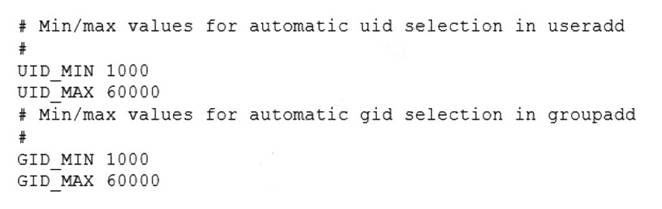
To which of the following configuration files will the required changes need to be made?
- A. /etc/login.defs
- B. /etc/security/limits.conf
- C. /etc/default/useradd
- D. /etc/profile
Answer: A
Explanation:
The required changes need to be made to the /etc/login.defs configuration file. The /etc/login.defs file defines the default values for user and group IDs, passwords, shells, and other parameters for user and group creation. The file contains the directives UID_MIN, UID_MAX, GID_MIN, and GID_MAX, which set the minimum and maximum values for automatic user and group ID selection. The administrator can edit this file and change the values to match the organization’s new cybersecurity policies. This is the correct file to modify to accomplish the task. The other options are incorrect because they either do not affect the user and group IDs (/etc/security/limits.conf or /etc/profile) or do not set the default values (/etc/default/useradd). References: CompTIA Linux+ (XK0-005) Certification Study Guide, Chapter 15: Managing Users and Groups, page 463.
NEW QUESTION 9
An administrator deployed a Linux server that is running a web application on port 6379/tcp.
SELinux is in enforcing mode based on organization policies. The port is open on the firewall.
Users who are trying to connect to a local instance of the web application receive Error 13, Permission denied.
The administrator ran some commands that resulted in the following output: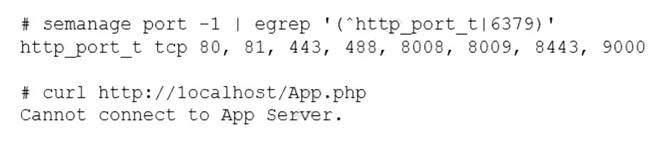
Which of the following commands should be used to resolve the issue?
- A. semanage port -d -t http_port_t -p tcp 6379
- B. semanage port -a -t http_port_t -p tcp 6379
- C. semanage port -a http_port_t -p top 6379
- D. semanage port -l -t http_port_tcp 6379
Answer: B
Explanation:
The command semanage port -a -t http_port_t -p tcp 6379 adds a new port definition to the SELinux policy and assigns the type http_port_t to the port 6379/tcp. This allows the web application to run on this port and accept connections from users. This is the correct way to resolve the issue. The other options are incorrect because they either delete a port definition (-d), use the wrong protocol (top instead of tcp), or list the existing port definitions (-l). References: CompTIA Linux+ (XK0-005) Certification Study Guide, Chapter 18: Securing Linux Systems, page 535.
NEW QUESTION 10
A systems administrator is investigating why one of the servers has stopped connecting to the internet.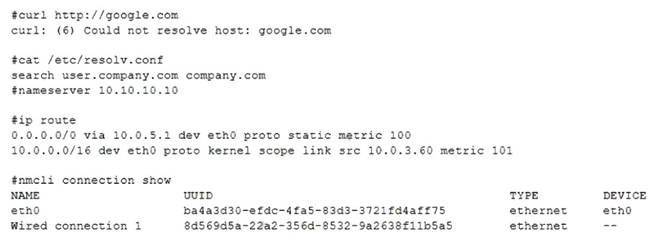
Which of the following is causing the issue?
- A. The DNS address has been commented out in the configuration file.
- B. The search entry in the /etc/resolv.conf file is incorrect.
- C. Wired connection 1 is offline.
- D. No default route is defined.
Answer: D
Explanation:
The issue is caused by the lack of a default route defined in the /etc/sysconfig/network-scripts/ifcfg-enp0s3 file. A default route is a special route that specifies where to send packets that do not match any other routes in the routing table. Without a default route, the server will not be able to communicate with hosts outside its local network. The default route is usually configured with the GATEWAY option in the network interface configuration file. For example, to set the default gateway to 192.168.1.1, the file should contain:
GATEWAY=192.168.1.1
The other options are not causing the issue. The DNS address is not commented out in the configuration file, it is specified with the DNS1 option. The search entry in the /etc/resolv.conf file is correct, it specifies the domain name to append to unqualified hostnames. Wired connection 1 is online, as indicated by the ONBOOT=yes option and the output of ip link show enp0s3 command. References: Configuring IP Networking with nmcli; Configuring IP Networking with ifcfg Files
NEW QUESTION 11
A systems administrator has been tasked with disabling the nginx service from the environment to prevent it from being automatically and manually started. Which of the following commands will accomplish this task?
- A. systemct1 cancel nginx
- B. systemct1 disable nginx
- C. systemct1 mask nginx
- D. systemct1 stop nginx
Answer: C
Explanation:
The command systemct1 mask nginx disables the nginx service from the environment and prevents it from being automatically and manually started. This command creates a symbolic link from the service unit file to /dev/null, which makes the service impossible to start. This is the correct way to accomplish the task. The other options are incorrect because they either do not exist (systemct1 cancel nginx), do not prevent manual start (systemct1 disable nginx), or do not prevent automatic start (systemct1 stop nginx). References: CompTIA Linux+ (XK0-005) Certification Study Guide, Chapter 14: Managing Processes and Scheduling Tasks, page 429.
NEW QUESTION 12
A User on a Linux workstation needs to remotely start an application on a Linux server and then forward the graphical display of that application back to the Linux workstation. Which of the following would enable the user to perform this action?
- A. ssh -X user@server application
- B. ssh -y user@server application
- C. ssh user@server application
- D. ssh -D user@server application
Answer: A
Explanation:
The ssh -X option enables X11 forwarding, which allows the user to run graphical applications on the remote server and display them on the local workstation. The user needs to specify the username, the server address, and the application name after the ssh -X command. The remote server also needs to have X11Forwarding enabled and xauth installed for this to work. References:
✑ The web search result 8 explains how to run a GUI application through SSH by configuring both the SSH client and server.
✑ The web search result 6 provides a detailed answer on how to forward X over SSH to run graphics applications remotely, with examples and troubleshooting tips.
✑ The CompTIA Linux+ Certification Exam Objectives mention that the candidate should be able to “use SSH for remote access and management” as part of the System Operation and Maintenance domain1.
NEW QUESTION 13
A cloud engineer needs to check the link status of a network interface named eth1 in a Linux server. Which of the following commands can help to achieve the goal?
- A. ifconfig hw eth1
- B. netstat -r eth1
- C. ss -ti eth1
- D. ip link show eth1
Answer: D
Explanation:
The ip link show eth1 command can be used to check the link status of a network interface named eth1 in a Linux server. It will display information such as the MAC address, MTU, state, and flags of the interface. The ifconfig hw eth1 command is invalid, as hw is not a valid option for ifconfig. The netstat -r eth1 command would display the routing table for eth1, not the link status. The ss -ti eth1 command would display TCP information for sockets associated with eth1, not the link status. References: CompTIA Linux+ (XK0- 005) Certification Study Guide, Chapter 13: Networking Fundamentals, page 436.
NEW QUESTION 14
A Linux administrator is creating a primary partition on the replacement hard drive for an application server. Which of the following commands should the administrator issue to verify the device name of this partition?
- A. sudo fdisk /dev/sda
- B. sudo fdisk -s /dev/sda
- C. sudo fdisk -l
- D. sudo fdisk -h
Answer: C
Explanation:
The command sudo fdisk -l should be issued to verify the device name of the partition. The sudo command allows the administrator to run commands as the superuser or another user. The fdisk command is a tool for manipulating disk partitions on Linux systems. The -l option lists the partitions on all disks or a specific disk. The command sudo fdisk -l will show the device names, sizes, types, and other information of the partitions on all disks. The administrator can identify the device name of the partition by looking at the output. This is the correct command to use to accomplish the task. The other options are incorrect because they either do not list the partitions (sudo fdisk /dev/sda or sudo fdisk -h) or do not exist (sudo fdisk -s /dev/sda). References: CompTIA Linux+ (XK0-005) Certification Study Guide, Chapter 10: Managing Storage, page 317.
NEW QUESTION 15
A development team asks an engineer to guarantee the persistency of journal log files across system reboots. Which of the following commands would accomplish this task?
- A. grep -i auto /etc/systemd/journald.conf && systemct1 restart systemd-journald.service
- B. cat /etc/systemd/journald.conf | awk '(print $1,$3)'
- C. sed -i 's/auto/persistent/g' /etc/systemd/journald.conf && sed -i 'persistent/s/ˆ#//q'/etc/systemd/journald.conf
- D. journalctl --list-boots && systemct1 restart systemd-journald.service
Answer: C
Explanation:
The command sed -i 's/auto/persistent/g' /etc/systemd/journald.conf && sed - i 'persistent/s/ˆ#//q' /etc/systemd/journald.conf will accomplish the task of guaranteeing the persistency of journal log files across system reboots. The sed command is a tool for editing text files on Linux systems. The -i option modifies the file in place. The s command substitutes one string for another. The g flag replaces all occurrences of the string.
The && operator executes the second command only if the first command succeeds. The q command quits after the first match. The /etc/systemd/journald.conf file is a configuration file for the systemd-journald service, which is responsible for collecting and storing log messages. The command sed -i 's/auto/persistent/g' /etc/systemd/journald.conf will replace the word auto with the word persistent in the file. This will change the value of the Storage option, which controls where the journal log files are stored. The value auto means that the journal log files are stored in the volatile memory and are lost after reboot, while the value persistent means that the journal log files are stored in the persistent storage and are preserved across reboots. The command sed -i 'persistent/s/ˆ#//q' /etc/systemd/journald.conf will remove the # character at the beginning of the line that contains the word persistent. This will uncomment the Storage option and enable it. The command sed -i 's/auto/persistent/g' /etc/systemd/journald.conf && sed -i 'persistent/s/ˆ#//q' /etc/systemd/journald.conf will guarantee the persistency of journal log files across system reboots by changing and enabling the Storage option to persistent. This is the correct command to use to accomplish the task. The other options are incorrect because they either do not change the value of the Storage option (grep -i auto /etc/systemd/journald.conf && systemct1 restart systemd-journald.service or cat /etc/systemd/journald.conf | awk '(print $1,$3)') or do not enable the Storage option (journalctl --list-boots && systemct1 restart systemd- journald.service). References: CompTIA Linux+ (XK0-005) Certification Study Guide, Chapter 16: Managing Logging and Monitoring, page 489.
NEW QUESTION 16
......
100% Valid and Newest Version XK0-005 Questions & Answers shared by Downloadfreepdf.net, Get Full Dumps HERE: https://www.downloadfreepdf.net/XK0-005-pdf-download.html (New 389 Q&As)
- [2021-New] CompTIA SK0-004 Dumps With Update Exam Questions (121-130)
- [2021-New] CompTIA SY0-401 Dumps With Update Exam Questions (681-689)
- [2021-New] CompTIA SY0-401 Dumps With Update Exam Questions (491-500)
- [2021-New] CompTIA CAS-002 Dumps With Update Exam Questions (3-12)
- [2021-New] CompTIA CAS-002 Dumps With Update Exam Questions (131-140)
- Up To The Minute CompTIA Cybersecurity Analyst (CySA+) Certification Exam CS0-002 Free Practice Questions
- All About Simulation PT0-002 Question
- Improved XK0-005 Testing Material For CompTIA Linux+ Certification Exam Certification
- [2021-New] CompTIA SY0-401 Dumps With Update Exam Questions (81-90)
- Updated SY0-601 Exam Engine For CompTIA Security+ Exam Certification