

XK0-005 Exam Questions - Online Test
XK0-005 Premium VCE File

150 Lectures, 20 Hours

Exam Code: XK0-005 (Practice Exam Latest Test Questions VCE PDF)
Exam Name: CompTIA Linux+ Certification Exam
Certification Provider: CompTIA
Free Today! Guaranteed Training- Pass XK0-005 Exam.
Free demo questions for CompTIA XK0-005 Exam Dumps Below:
NEW QUESTION 1
A Linux administrator is tasked with adding users to the system. However, the administrator wants to ensure the users’ access will be disabled once the project is over. The expiration date should be 2021-09-30. Which of the following commands will accomplish this task?
- A. sudo useradd -e 2021-09-30 Project_user
- B. sudo useradd -c 2021-09-30 Project_user
- C. sudo modinfo -F 2021-09-30 Project_uses
- D. sudo useradd -m -d 2021-09-30 Project_user
Answer: A
Explanation:
The command that will accomplish this task is sudo useradd -e 2021-09-30 Project_user. This command will create a new user account named Project_user with an expiration date of 2021-09-30. The -e option of useradd specifies the date on which the user account will be disabled in YYYY-MM-DD format.
The other options are not correct commands for creating a user account with an expiration date. The sudo useradd -c 2021-09-30 Project_user command will create a new user account named Project_user with a comment of 2021-09-30. The -c option of useradd specifies a comment or description for the user account, not an expiration date. The sudo modinfo -F 2021-09-30 Project_user command is invalid because modinfo is not a command for managing user accounts, but a command for displaying information about kernel modules. The -F option of modinfo specifies a field name to show, not an expiration date. The sudo useradd -m -d 2021-09-30 Project_user command will create a new user account named Project_user with a home directory of 2021-09-30. The -m option of useradd specifies that the home directory should be created if it does not exist, and the -d option specifies the home directory name, not an expiration date. References: useradd(8) - Linux manual page; modinfo(8) - Linux manual page
NEW QUESTION 2
After connecting to a remote host via SSH, an administrator attempts to run an application but receives the following error:
[user@workstation ~]$ ssh admin@srv1 Last login: Tue Mar 29 18:03:34 2022
[admin@srvl ~] $ /usr/local/bin/config_manager Error: cannot open display:
[admin@srv1 ~] $
Which of the following should the administrator do to resolve this error?
- A. Disconnect from the SSH session and reconnect using the ssh -x command.
- B. Add Options X11 to the /home/admin/.ssh/authorized_keys file.
- C. Open port 6000 on the workstation and restart the firewalld service.
- D. Enable X11 forwarding in /etc/ssh/ssh_config and restart the server.
Answer: A
Explanation:
The error indicates that the application requires an X11 display, but the SSH session does not forward the X11 connection. To enable X11 forwarding, the administrator needs to use the ssh -X option, which requests X11 forwarding with authentication spoofing. This will set the DISPLAY environment variable on the remote host and allow the application to open a window on the local display.
References
✑ CompTIA Linux+ (XK0-005) Certification Study Guide, page 314
✑ Open a window on a remote X display (why “Cannot open display”)?, answer by Gilles ‘SO- stop being evil’
NEW QUESTION 3
A Linux administrator created a new file system. Which of the following files must be updated to ensure the filesystem mounts at boot time?
- A. /etc/sysctl
- B. /etc/filesystems
- C. /etc/fstab
- D. /etc/nfsmount.conf
Answer: C
Explanation:
The file that must be updated to ensure the filesystem mounts at boot time is /etc/fstab. This file contains information about the filesystems that are mounted automatically by the mount -a command, which is usually invoked during the system startup. The /etc/fstab file has six fields for each filesystem: device name, mount point, filesystem type, mount options, dump frequency, and pass number. To add a new filesystem to the /etc/fstab file, you need to specify these fields correctly and make sure the mount point directory exists.
The other options are not correct files for controlling persistent mount points of filesystems. The /etc/sysctl file is used to configure kernel parameters at runtime. The /etc/filesystems file is used to specify the order of filesystem types used by mount when no filesystem type is given. The /etc/nfsmount.conf file is used to set options for mounting NFS
filesystems. References: Persistently mounting file systems; fstab(5) - Linux manual page
NEW QUESTION 4
A systems administrator needs to verify whether the built container has the app.go file in its root directory. Which of the following can the administrator use to verify the root directory has this file?
- A. docker image inspect
- B. docker container inspect
- C. docker exec <container_name> ls
- D. docker ps <container_name>
Answer: C
Explanation:
The docker exec <container_name> ls command can be used to verify whether the built container has the app.go file in its root directory. This command will run the ls command inside the specified container and list the files and directories in its root directory. If the app.go file is present, it will be displayed in the output. The docker image inspect command will display information about an image, not a container, and it will not list the files inside the image. The docker container inspect command will display information about a container, not its files. The docker ps <container_name> command is invalid, as ps does not accept a container name as an argument. References: CompTIA Linux+ (XK0-005) Certification Study Guide, Chapter 16: Virtualization and Cloud Technologies, page 499.
NEW QUESTION 5
A Linux administrator needs to create a new user named user02. However, user02 must be in a different home directory, which is under /comptia/projects. Which of the following commands will accomplish this task?
- A. useradd -d /comptia/projects user02
- B. useradd -m /comptia/projects user02
- C. useradd -b /comptia/projects user02
- D. useradd -s /comptia/projects user02
Answer: A
Explanation:
The command useradd -d /comptia/projects user02 will accomplish the task of creating a new user named user02 with a different home directory.
The useradd command is a tool for creating new user accounts on Linux systems. The - d option specifies the home directory for the new user, which is the directory where the user’s personal files and settings are stored. The /comptia/projects is the path of the home directory for the new user, which is different from the default location of /home/user02.
The user02 is the name of the new user. The command useradd -d /comptia/projects user02 will create a new user named user02 with a home directory under /comptia/projects. This is the correct command to use to accomplish the task. The other options are incorrect because they either do not specify the home directory for the new user (useradd -m /comptia/projects user02 or useradd -s /comptia/projects user02) or do not use the correct option for the home directory (useradd -b /comptia/projects user02 instead of useradd -d /comptia/projects user02). References: CompTIA Linux+ (XK0-005) Certification Study Guide, Chapter 13: Managing Users and Groups, page 403.
NEW QUESTION 6
When trying to log in remotely to a server, a user receives the following message:
The server administrator is investigating the issue on the server and receives the following outputs: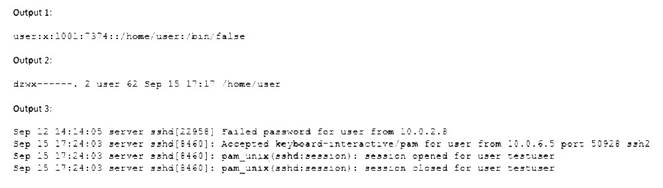
Which of the following is causing the issue?
- A. The wrong permissions are on the user’s home directory.
- B. The account was locked out due to three failed logins.
- C. The user entered the wrong password.
- D. The user has the wrong shell assigned to the account.
Answer: D
Explanation:
The user has the wrong shell assigned to the account, which is causing the issue. The output 1 shows that the user’s shell is set to /bin/false, which is not a valid shell and will prevent the user from logging in. The output 2 shows that the user’s home directory has the correct permissions (drwxr-xr-x), and the output 3 shows that the user entered the correct password and was accepted by the SSH daemon, but the session was closed immediately due to the invalid shell. The other options are incorrect because they are not supported by the outputs. References: CompTIA Linux+ (XK0-005) Certification Study Guide, Chapter 13: Managing Network Services, page 413.
NEW QUESTION 7
A Linux system is having issues. Given the following outputs:
# dig @192.168.2.2 mycomptiahost
; << >> DiG 9.9.4-RedHat-9.9.4-74.el7_6.1 << >> @192.168.2.2 mycomptiahost
; (1 server found)
;; global options: +cmd
;; connection timed out; no servers could be reached
# nc -v 192.168.2.2 53
Ncat: Version 7.70 ( https://nmap.org/ncat ) Ncat: Connection timed out.
# ping 192.168.2.2
PING 192.168.2.2 (192.168.2.2) 56(84) bytes of data.
64 bytes from 192.168.2.2: icmp_seq=1 ttl=117 time=4.94 ms 64 bytes from 192.168.2.2: icmp_seq=2 ttl=117 time=10.5 ms Which of the following best describes this issue?
- A. The DNS host is down.
- B. The name mycomptiahost does not exist in the DNS.
- C. The Linux engineer is using the wrong DNS port.
- D. The DNS service is currently not available or the corresponding port is blocked.
Answer: D
Explanation:
The ping command shows that the Linux system can reach the DNS server at 192.168.2.2, so the DNS host is not down. The dig and nc commands show that the Linux system cannot connect to the DNS server on port 53, which is the standard port for DNS queries. This means that either the DNS service is not running on the DNS server, or there is a firewall or network device blocking the port 53 traffic. Therefore, the DNS service is currently not available or the corresponding port is blocked.References1: How To Troubleshoot DNS Client Issues in Linux - RootUsers2: 6 Best Tools to Troubleshoot DNS
Issues in Linux - Tecmint3: How To Troubleshoot DNS in Linux - OrcaCore4: Fixing DNS Issues in Ubuntu 20.04 | DeviceTests
NEW QUESTION 8
A non-privileged user is attempting to use commands that require elevated account permissions, but the commands are not successful. Which of the following most likely needs to be updated?
- A. /etc/passwd
- B. /etc/shadow
- C. /etc/sudoers
- D. /etc/bashrc
Answer: C
Explanation:
The /etc/sudoers file is used to configure the sudo command, which allows non-privileged users to execute commands that require elevated account permissions1. The file contains a list of users and groups that are allowed to use sudo, and the commands they can run with it. The file also defines the security policy for sudo, such as whether a password is required, how long the sudo session lasts, and what environment variables are preserved or reset.
The /etc/passwd file is used to store information about the user accounts on the system, such as their username, user ID, home directory, and login shell. The /etc/shadow file is used to store the encrypted passwords for the user accounts, along with other information such as password expiration and aging. These files are not directly related to the sudo command, and updating them will not grant a user elevated account permissions.
The /etc/bashrc file is used to set up the environment for the bash shell, such as aliases, functions, variables, and options. This file is executed whenever a new bash shell is started, and it affects all users on the system. However, this file does not control the sudo command or its configuration, and updating it will not allow a user to use commands that require elevated account permissions.
NEW QUESTION 9
A new application container was built with an incorrect version number. Which of the following commands should be used to rename the image to match the correct version 2.1.2?
- A. docker tag comptia/app:2.1.1 comptia/app:2.1.2
- B. docker push comptia/app:2.1.1 comptia/app:2.1.2
- C. docker rmi comptia/app:2.1.1 comptia/app:2.1.2
- D. docker update comptia/app:2.1.1 comptia/app:2.1.2
Answer: A
Explanation:
The best command to use to rename the image to match the correct version 2.1.2 is A. docker tag comptia/app:2.1.1 comptia/app:2.1.2. This command will create a new tag for the existing image with the new version number, without changing the image content or ID. The other commands are either incorrect or not suitable for this task. For example:
✑ B. docker push comptia/app:2.1.1 comptia/app:2.1.2 will try to push two images to a remote repository, but it does not rename the image locally.
✑ C. docker rmi comptia/app:2.1.1 comptia/app:2.1.2 will try to remove two images
from the local system, but it does not rename the image.
✑ D. docker update comptia/app:2.1.1 comptia/app:2.1.2 will try to update the configuration of a running container, but it does not rename the image.
NEW QUESTION 10
Which of the following can be used as a secure way to access a remote termi-nal?
- A. TFTP
- B. SSH
- C. SCP
- D. SFTP
Answer: B
Explanation:
SSH, or Secure Shell, is a protocol that allows you to access a remote terminal or virtual machine securely over an encrypted connection. You can use SSH to run commands, transfer files, or tunnel network traffic on a remote system. To use SSH, you need an SSH client program on your local system and an SSH server program on the remote system. You also need to authenticate yourself using a username and password or a public/private key pair. SSH is widely used by system administrators, developers, and engineers to remotely manage Linux servers and other devices.
The other options are not correct answers. TFTP, or Trivial File Transfer Protocol, is a simple protocol that allows you to transfer files between systems, but it does not provide any security or encryption features. SCP, or Secure Copy Protocol, is a protocol that uses SSH to securely copy files between systems, but it does not provide a remote terminal access. FTP, or File Transfer Protocol, is another protocol that allows you to transfer files between systems, but it also does not provide any security or encryption features.
NEW QUESTION 11
A Linux systems administrator is troubleshooting an I/O latency on a single CPU server. The administrator runs a top command and receives the following output:
%Cpu(s): 0.2 us, 33.1 sy, 0.0 ni, 0.0 id, 52.4 wa, 0.0 hi, 0.2 si, 0.0 st
Which of the following is correct based on the output received from the exe-cuted command?
- A. The server's CPU is taking too long to process users' requests.
- B. The server's CPU shows a high idle-time value.
- C. The server's CPU is spending too much time waiting for data inputs.
- D. The server's CPU value for the time spent on system processes is low.
Answer: C
Explanation:
The server’s CPU is spending too much time waiting for data inputs. This can be inferred from the output of the top command, which shows the percentage of CPU time spent in different states. The wa state stands for wait, and it indicates that the CPU is idle while waiting for an I/O operation to complete. In this case, the wa state is 52.4%, which means that more than half of the CPU time is wasted on waiting for data inputs. This can cause a high I/O latency and affect the performance of the server.
The other options are not correct based on the output received from the executed command. The server’s CPU is not taking too long to process users’ requests, because the us state, which stands for user, is only 0.2%, which means that the CPU is barely used by user processes. The server’s CPU does not show a high idle-time value, because the id state, which stands for idle, is 0.0%, which means that the CPU is not idle at all. The server’s CPU value for the time spent on system processes is not low, because the sy state, which stands for system, is 33.1%, which means that the CPU is heavily used by system processes.
References: How to Use the Linux top Command (and Understand Its Output); [Understanding Linux CPU Load - when should you be worried?]
NEW QUESTION 12
A systems administrator is adding a Linux-based server and removing a Windows-based server from a cloud-based environment. The changes need to be validated before they are applied to the cloud-based environment. Which of the following tools should be used to meet this requirement?
- A. Ansible
- B. git clone
- C. git pull
- D. terraform plan
Answer: D
Explanation:
Terraform is a tool for building, changing, and managing infrastructure as code in a cloud- based environment. Terraform uses configuration files to describe the desired state of the infrastructure and applies changes accordingly. Terraform supports various cloud providers, such as AWS, Azure, Google Cloud Platform, and more.
To validate changes before they are applied to the cloud-based environment, the administrator can use the terraform plan command. This command will compare the current state of the infrastructure with the desired state defined in the configuration files and show what actions will be performed to achieve the desired state. This command will not make any changes to the infrastructure but only show a plan of changes. The statement D is correct.
The statements A, B, and C are incorrect because they do not validate changes before they are applied to the cloud-based environment. Ansible is another tool for automating infrastructure management, but it does not have a plan command. Git clone and git pull are commands for working with git repositories, which are used for version control of code. References: [How to Use Terraform to Manage Cloud Infrastructure]
NEW QUESTION 13
An administrator would like to securely connect to a server and forward port 8080 on a local machine to port 80 on the server. Which of the following commands should the administrator use to satisfy both requirements?
- A. ssh —L 8080: localhost:80 admin@server
- B. ssh —R 8080: localhost:80 admin@server
- C. ssh —L 80 : localhost:8080 admin@server
- D. ssh —R 80 : localhost:8080 admin@server
Answer: A
Explanation:
This command will create a local port forwarding, which means that connections from the SSH client are forwarded via the SSH server, then to a destination server. In this case, the destination server is the same as the SSH server (localhost), and the destination port is 80. The SSH client will listen on port 8080 on the local machine, and any connection to that port will be forwarded to port 80 on the server. This way, the administrator can securely access the web service running on port 80 on the server by using http://localhost:8080 on the local machine.
The other options are incorrect because:
* B. ssh -R 8080:localhost:80 admin@server
This command will create a remote port forwarding, which means that connections from the SSH server are forwarded via the SSH client, then to a destination server. In this case, the destination server is the same as the SSH client (localhost), and the destination port is 80. The SSH server will listen on port 8080 on the remote machine, and any connection to that port will be forwarded to port 80 on the client. This is not what the administrator wants to do.
* C. ssh -L 80:localhost:8080 admin@server
This command will also create a local port forwarding, but it will use port 80 on the local machine and port 8080 on the server. This is not what the administrator wants to do, and it may also fail if port 80 is already in use by another service on the local machine.
* D. ssh -R admin@server
This command is incomplete and invalid. It does not specify any port numbers or destination addresses for the remote port forwarding. It will also fail if the SSH server does not allow remote port forwarding.
References:
✑ CompTIA Linux+ Certification Exam Objectives
✑ How to Set up SSH Tunneling (Port Forwarding)
NEW QUESTION 14
A systems administrator checked out the code from the repository, created a new branch, made changes to the code, and then updated the main branch. The systems administrator wants to ensure that the Terraform state files do not appear in the main branch. Which of following should the administrator use to meet this requirement?
- A. clone
- B. gitxgnore
- C. get
- D. .ssh
Answer: B
Explanation:
To prevent certain files from being tracked by Git, the administrator can use a .gitignore file (B) in the repository. The .gitignore file can specify patterns of files or directories that Git should ignore. This way, the Terraform state files will not appear in the main branch or any other branch. The other commands are not related to this requirement. References:
✑ [CompTIA Linux+ Study Guide], Chapter 10: Working with Git, Section: Ignoring Files with .gitignore
✑ [How to Use .gitignore File]
NEW QUESTION 15
A junior systems administrator recently installed an HBA card in one of the servers that is deployed for a production environment. Which of the following commands can the administrator use to confirm on which server the card was installed?
- A. lspci | egrep 'hba| fibr'
- B. lspci | zgrep 'hba | fibr'
- C. lspci | pgrep 'hba| fibr'
- D. lspci | 'hba | fibr'
Answer: A
Explanation:
The best command to use to confirm on which server the HBA card was installed is A. lspci
| egrep ‘hba| fibr’. This command will list all the PCI devices on the server and filter the output for those that match the pattern ‘hba’ or ‘fibr’, which are likely to be related to the HBA card. The egrep command is a variant of grep that supports extended regular expressions, which allow the use of the ‘|’ operator for alternation. The other commands are either invalid or will not produce the desired output. For example:
✑ B. lspci | zgrep ‘hba | fibr’ will try to use zgrep, which is a command for searching compressed files, not standard output.
✑ C. lspci | pgrep ‘hba| fibr’ will try to use pgrep, which is a command for finding processes by name or other attributes, not text patterns.
✑ D. lspci | ‘hba | fibr’ will try to use ‘hba | fibr’ as a command, which is not valid and will cause an error.
NEW QUESTION 16
......
Thanks for reading the newest XK0-005 exam dumps! We recommend you to try the PREMIUM DumpSolutions.com XK0-005 dumps in VCE and PDF here: https://www.dumpsolutions.com/XK0-005-dumps/ (389 Q&As Dumps)
- [2021-New] CompTIA CAS-002 Dumps With Update Exam Questions (91-100)
- [2021-New] CompTIA CAS-002 Dumps With Update Exam Questions (9-18)
- Top Tips Of Regenerate 220-1101 Preparation Exams
- [2021-New] CompTIA N10-006 Dumps With Update Exam Questions (81-90)
- [2021-New] CompTIA SK0-004 Dumps With Update Exam Questions (41-50)
- [2021-New] CompTIA CAS-002 Dumps With Update Exam Questions (6-15)
- [2021-New] CompTIA 220-902 Dumps With Update Exam Questions (11-20)
- [2021-New] CompTIA SY0-401 Dumps With Update Exam Questions (641-650)
- [2021-New] CompTIA SY0-401 Dumps With Update Exam Questions (531-540)
- [2021-New] CompTIA CAS-002 Dumps With Update Exam Questions (10-19)