

XK0-005 Exam Questions - Online Test
XK0-005 Premium VCE File

150 Lectures, 20 Hours

Act now and download your CompTIA XK0-005 test today! Do not waste time for the worthless CompTIA XK0-005 tutorials. Download Improved CompTIA CompTIA Linux+ Certification Exam exam with real questions and answers and begin to learn CompTIA XK0-005 with a classic professional.
Free demo questions for CompTIA XK0-005 Exam Dumps Below:
NEW QUESTION 1
Which of the following data structures is written in JSON?
A)
B)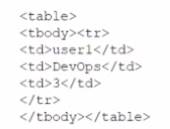
C)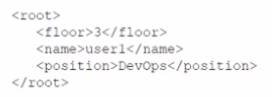
D)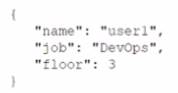
- A. Option A
- B. Option B
- C. Option C
- D. Option D
Answer: C
Explanation:
Option C is the only data structure that is written in JSON format. JSON stands for JavaScript Object Notation, and it is a lightweight and human-readable data interchange format. JSON uses curly braces to enclose objects, which consist of key-value pairs separated by commas. JSON uses square brackets to enclose arrays, which consist of values separated by commas. JSON supports six data types: strings, numbers, booleans, null, objects, and arrays. Option C follows these rules and syntax of JSON, while the other options do not. Option A is written in XML format, which uses tags to enclose elements and attributes. Option B is written in YAML format, which uses indentation and colons to define key-value pairs. Option D is written in INI format, which uses sections and equal signs to define key-value pairs. References: CompTIA Linux+ (XK0-005) Certification Study Guide, Chapter 21: Automating Tasks with Ansible, page 591.
NEW QUESTION 2
A systems administrator wants to upgrade /bin/ someapp to a new version, but the administrator does not know the package name. Which of the following will
show the RPM package name that provides that binary file?
- A. rpm —qf /bin/ someapp
- B. rpm —Vv / bin/ someapp
- C. rpm - P / bin/ some app
- D. rpm —i / bin/ someapp
Answer: A
Explanation:
The rpm command is used to manage RPM packages on Linux systems. The -qf option queries the package name that provides a given file. Therefore, the command rpm -qf /bin/someapp will show the RPM package name that provides the binary file /bin/someapp. The statements B, C, and D are incorrect because they do not query the package name, but rather verify, remove, or install a package. References: [How to Use RPM Command in Linux with Examples]
NEW QUESTION 3
A systems administrator is configuring a Linux system so the network traffic from the internal network 172.17.0.0/16 going out through the eth0 interface would appear as if it was sent directly from this interface. Which of the following commands will accomplish this task?
- A. iptables -A POSTROUTING -s 172.17.0.0/16 -o eth0 -j MASQUERADE
- B. firewalld -A OUTPUT -s 172.17.0.0/16 -o eth0 -j DIRECT
- C. nmcli masq-traffic eth0 -s 172.17.0.0/16 -j MASQUERADE
- D. ifconfig -- nat eth0 -s 172.17.0.0/16 -j DIRECT
Answer: A
Explanation:
This command will use the iptables tool to append a rule to the POSTROUTING chain of the nat table, which will match any packet with a source address of 172.17.0.0/16 and an output interface of eth0, and apply the MASQUERADE target to it. This means that the packet will have its source address changed to the address of the eth0 interface, effectively hiding the internal network behind a NAT12.
References: 1: Iptables NAT and Masquerade rules - what do they do? 2: Routing from docker containers using a different physical network interface and default gateway
NEW QUESTION 4
A Linux engineer set up two local DNS servers (10.10.10.10 and 10.10.10.20) and was testing email connectivity to the local mail server using the mail command on a local machine when the following error appeared:
The local machine DNS settings are: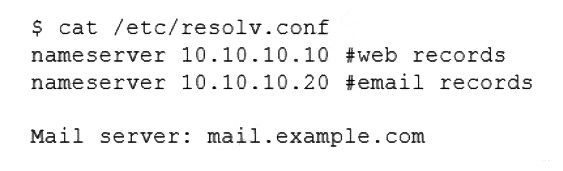
Which of the following commands could the engineer use to query the DNS server to get mail server information?
- A. dig @example.com 10.10.10.20 a
- B. dig @10.10.10.20 example.com mx
- C. dig @example.com 10.10.10.20 ptr
- D. dig @10.10.10.20 example.com ns
Answer: B
Explanation:
The command dig @10.10.10.20 example.com mx will query the DNS server to get mail server information. The dig command is a tool for querying DNS servers and displaying the results. The @ option specifies the DNS server to query, in this case 10.10.10.20. The mx option specifies the type of record to query, in this case mail exchange (MX) records, which identify the mail servers for a domain. The domain name to query is example.com. This command will show the MX records for example.com from the DNS server 10.10.10.20. This is the correct command to use to accomplish the task. The other options are incorrect because they either use the wrong syntax (@example.com 10.10.10.20 instead of @10.10.10.20 example.com), the wrong type of record (a or ptr instead of mx), or the wrong domain name (example.com ns instead of example.com mx). References: CompTIA Linux+ (XK0-005) Certification Study Guide, Chapter 13: Managing Network Services, page 415.
NEW QUESTION 5
The application team has reported latency issues that are causing the application to crash on the Linux server. The Linux administrator starts
troubleshooting and receives the following output: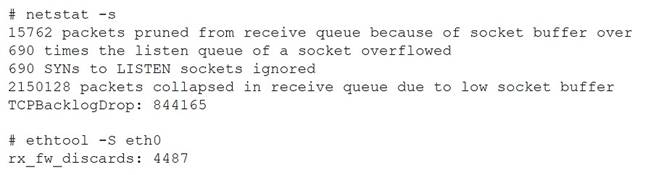
Which of the following commands will improve the latency issue?
- A. # echo 'net.core.net_backlog = 5000000' >> /etc/sysctl.conf# sysctl -p# systemctl daemon-reload
- B. # ifdown eth0# ip link set dev eth0 mtu 800# ifup eth0
- C. # systemctl stop network# ethtool -g eth0 512# systemctl start network
- D. # echo 'net.core.rmem max = 12500000' >> /etc/sysctl.conf# echo 'net.core.wmem_max = 12500000' >> /etc/sysctl.conf# sysctl -p
Answer: D
Explanation:
The best command to use to improve the latency issue is D. # echo ‘net.core.rmem max = 12500000’ >> /etc/sysctl.conf # echo ‘net.core.wmem_max = 12500000’ >> /etc/sysctl.conf # sysctl -p. This command will increase the size of the receive and send buffers for the network interface, which can improve the network performance and reduce packet loss. The sysctl command will apply the changes to the kernel parameters without rebooting the system.
The other commands are either incorrect or not suitable for this task. For example:
✑ A. # echo ‘net.core.net_backlog = 5000000’ >> /etc/sysctl.conf # sysctl -p # systemctl daemon-reload will try to increase the backlog queue for incoming connections, but this is not relevant for the latency issue. The systemctl daemon- reload command is also unnecessary, as it only reloads the systemd configuration files, not the kernel parameters.
✑ B. # ifdown eth0 # ip link set dev eth0 mtu 800 # ifup eth0 will try to change the maximum transmission unit (MTU) of the network interface to 800 bytes, but this is too low and may cause fragmentation and performance degradation. The default MTU for Ethernet is 1500 bytes, and it should not be changed unless there is a specific reason.
✑ C. # systemctl stop network # ethtool -g eth0 512 # systemctl start network will try to change the ring buffer size of the network interface to 512, but this is too small and may cause packet drops and latency spikes. The default ring buffer size for Ethernet is usually 4096 or higher, and it should be increased if there is a high network traffic.
NEW QUESTION 6
A systems administrator is gathering information about a file type and the contents of a file. Which of the following commands should the administrator use to accomplish this task?
- A. file filename
- B. touch filename
- C. grep filename
- D. lsof filename
Answer: A
Explanation:
The file command is used to determine the type of a file by examining its contents. It can recognize many different formats, such as text, binary, executable, compressed, image, audio, video, etc. It can also display some additional information about the file, such as encoding, size, dimensions, etc12
References: 1: file(1) - Linux manual page 2: How to use the file command in Linux
NEW QUESTION 7
One leg of an LVM-mirrored volume failed due to the underlying physical volume, and a systems administrator is troubleshooting the issue. The following output has been provided:
Given this scenario, which of the following should the administrator do to recover this volume?
- A. Reboot the serve
- B. The volume will automatically go back to linear mode.
- C. Replace the failed drive and reconfigure the mirror.
- D. Reboot the serve
- E. The volume will revert to stripe mode.
- F. Recreate the logical volume.
Answer: B
Explanation:
The administrator should replace the failed drive and reconfigure the mirror to recover the volume. The LVM (Logical Volume Manager) is a tool for managing disk space on Linux systems. The LVM allows the administrator to create logical volumes that span across multiple physical volumes, such as hard disks or partitions. The LVM also supports different types of logical volumes, such as linear, striped, or mirrored. A mirrored logical volume is a type of logical volume that creates a copy of the data on another physical volume, providing redundancy and fault tolerance. The output shows that the logical volume is mirrored and that one leg of the mirror has failed due to the underlying physical volume. This means that one of the physical volumes that contains the data of the logical volume is damaged or missing. This can cause data loss and performance degradation. The administrator should replace the failed drive and reconfigure the mirror to recover the volume. The administrator should identify the failed physical volume by using commands such as pvdisplay, vgdisplay, or lvdisplay. The administrator should then remove the failed physical volume from the volume group by using the vgreduce command.
The administrator should then install a new drive and create a new physical volume by using the pvcreate command. The administrator should then add the new physical volume to the volume group by using the vgextend command. The administrator should then reconfigure the mirror by using the lvconvert command. The administrator should replace the failed drive and reconfigure the mirror to recover the volume. This is the correct answer to the question. The other options are incorrect because they either do not recover the volume (reboot the server. The volume will automatically go back to linear mode or reboot the server. The volume will revert to stripe mode) or do not preserve the data of the volume (recreate the logical volume). References: CompTIA Linux+ (XK0-005) Certification Study Guide, Chapter 10: Managing Storage, pages 333-334.
NEW QUESTION 8
A Linux administrator has logged in to a server for the first time and needs to know which services are allowed through the firewall. Which of the following options will return the results for which the administrator is looking?
- A. firewall-cmd —get-services
- B. firewall-cmd —check-config
- C. firewall-cmd —list-services
- D. systemct1 status firewalld
Answer: C
Explanation:
The firewall-cmd --list-services command will return the results for which the administrator is looking. This command will list all services that are allowed through the firewall in the default zone or a specified zone. A service is a predefined set of ports and protocols that can be enabled or disabled by firewalld. The firewall-cmd --get-services command will list all available services that are supported by firewalld, not only those that are allowed through the firewall. The firewall-cmd --check-config command will check if firewalld configuration files are valid, not list services. The systemct1 status firewalld command will display information about the firewalld service unit, such as its state, PID, memory usage, and logs, not list services. References: CompTIA Linux+ (XK0-005) Certification Study Guide, Chapter 18: Securing Linux Systems, page 543.
NEW QUESTION 9
A Linux administrator provisioned a new web server with custom administrative permissions for certain users. The administrator receives a report that user1 is unable to restart the Apache web service on this server. The administrator reviews the following output:
[ root@server ] # id user1
UID=1011 (user1) gid=1011 (USER1) groups=1011 (user1), 101 (www-data), 1120 (webadmin)
[ root@server ] # cat /etc/sudoers.d/custom.conf
user1 ALL=/usr/sbin/systemctl start httpd, /usr/sbin/systemctl stop httpd webadmin ALL=NOPASSWD: /etc/init.d.httpd restart, /sbin/service httpd restart,
/usr/sbin/apache2ctl restart
#%wheel ALL=(ALL) NOPASSWD: ALL
Which of the following would most likely resolve the issue while maintaining a least privilege security model?
- A. User1 should be added to the wheel group to manage the service.
- B. User1 should have "NOPASSWD:" after the "ALL=" in the custo
- C. conf.
- D. The wheel line in the custo
- E. conf file should be uncommented.
- F. Webadmin should be listed as a group in the custo
- G. conf file.
Answer: D
Explanation:
The custom.conf file grants sudo privileges to user1 and webadmin for managing the Apache web service, but it uses different commands for each of them. User1 is allowed to use systemctl to start and stop the httpd service, while webadmin is allowed to use init.d, service, or apache2ctl to restart the httpd service. However, the user1 is unable to restart the service, only start and stop it. To fix this, user1 should be able to use the same commands as webadmin, which can be achieved by listing webadmin as a group in the custom.conf file, using the syntax %groupname. This way, user1 will inherit the sudo privileges of the webadmin group, and be able to restart the Apache web service without compromising the least privilege security model.
References
✑ Sudo and Sudoers Configuration | Servers for Hackers, section “Groups”
✑ Chapter 12. Managing sudo access - Red Hat Customer Portal, section “12.1.
Configuring sudo access for users and groups”
NEW QUESTION 10
A Linux administrator is troubleshooting a systemd mount unit file that is not working correctly. The file contains:
[root@system] # cat mydocs.mount [Unit]
Description=Mount point for My Documents drive [Mount]
What=/dev/drv/disk/by-uuid/94afc9b2-ac34-ccff-88ae-297ab3c7ff34 Where=/home/user1/My Documents
Options=defaults Type=xfs
[Install]
WantedBy=multi-user.target
The administrator verifies the drive UUID correct, and user1 confirms the drive should be
mounted as My Documents in the home directory. Which of the following can the administrator
do to fix the issues with mounting the drive? (Select two).
- A. Rename the mount file to home-user1-My\x20Documents.mount.
- B. Rename the mount file to home-user1-my-documents.mount.
- C. Change the What entry to /dev/drv/disk/by-uuid/94afc9b2\-ac34\-ccff\-88ae\- 297ab3c7ff34.
- D. Change the Where entry to Where=/home/user1/my\ documents.
- E. Change the Where entry to Where=/home/user1/My\x20Documents.
- F. Add quotes to the What and Where entries, such as What="/dev/drv/disk/by- uuid/94afc9b2-ac34-ccff-88ae-297ab3c7ff34" and Where="/home/user1/My Documents".
Answer: AE
Explanation:
The mount unit file name and the Where entry must be escaped to handle spaces in the path.ReferencesThe mount unit file name must be named after the mount point directory, with spaces replaced by \x20. See How to escape spaces in systemd unit files? and systemd.mount.The Where entry must use \x20 to escape spaces in the path. See systemd.mount and The workaround is to use /usr/bin/env followed by the path in quotes..
NEW QUESTION 11
A Linux administrator needs to transfer a local file named accounts . pdf to a remote / tmp directory of a server with the IP address 10.10.10.80. Which of the following commands needs to be executed to transfer this file?
- A. rsync user@10.10.10.80: /tmp accounts.pdf
- B. scp accounts.pdf user@10.10.10.80:/tmp
- C. cp user@10.10.10. 80: /tmp accounts.pdf
- D. ssh accounts.pdf user@10.10.10.80: /tmp
Answer: B
Explanation:
The best command to use to transfer the local file accounts.pdf to the remote /tmp directory of the server with the IP address 10.10.10.80 is B. scp accounts.pdf user@10.10.10.80:/tmp. This command will use the secure copy protocol (scp) to copy the file from the local machine to the remote server over SSH. The command requires the username and password of the user on the remote server, as well as the full path of the destination directory.
The other commands are either incorrect or not suitable for this task. For example:
✑ A. rsync user@10.10.10.80:/tmp accounts.pdf will try to use the rsync command to synchronize files between the local and remote machines, but it has the wrong syntax and order of arguments. The source should come before the destination, and a colon (:) should separate the remote host and path.
✑ C. cp user@10.10.10.80:/tmp accounts.pdf will try to use the cp command to copy files, but it does not work over SSH and it has the wrong syntax and order of arguments. The source should come before the destination, and a colon (:) should separate the remote host and path.
✑ D. ssh accounts.pdf user@10.10.10.80:/tmp will try to use the ssh command to log into the remote server, but it has the wrong syntax and arguments. The username should come before the remote host, and a file name is not a valid argument for ssh.
NEW QUESTION 12
A systems administrator made some changes in the ~/.bashrc file and added an alias command. When the administrator tried to use the alias command, it did not work. Which of the following should be executed FIRST?
- A. source ~/.bashrc
- B. read ~/.bashrc
- C. touch ~/.bashrc
- D. echo ~/.bashrc
Answer: A
Explanation:
The command source ~/.bashrc should be executed first to use the alias command. The source command reads and executes commands from a file in the current shell environment. The ~/.bashrc file is a configuration file that contains commands and aliases that are executed when a new bash shell is started. The administrator made some changes in the ~/.bashrc file and added an alias command, but the changes are not effective until the file is sourced or a new shell is started. The command source
~/.bashrc will reload the file and make the alias command available. The other options are incorrect because they either do not execute the commands in the file (read, touch, or echo) or do not affect the current shell environment (read or echo). References: CompTIA Linux+ (XK0-005) Certification Study Guide, Chapter 9: Working with the Linux Shell, page 295.
NEW QUESTION 13
A Linux engineer is setting the sticky bit on a directory called devops with 755 file permission. Which of the following commands will accomplish this task?
- A. chown -s 755 devops
- B. chown 1755 devops
- C. chmod -s 755 devops
- D. chmod 1755 devops
Answer: D
Explanation:
The command that will set the sticky bit on a directory called devops with 755 file permission is chmod 1755 devops. This command will use chmod to change the mode of the directory devops to 1755, which means that the owner has read, write, and execute permissions (7), the group has read and execute permissions (5), and others have read and execute permissions (5). The first digit 1 indicates that the sticky bit is set on the directory, which is a special permission that prevents users from deleting or renaming files
in the directory that they do not own.
The other options are not correct commands for setting the sticky bit on a directory. The chown -s 755 devops command is invalid because chown is used to change the owner and group of files or directories, not their permissions. The -s option for chown is used to remove a symbolic link, not to set the sticky bit. The chown 1755 devops command is also invalid because chown does not accept numeric arguments for changing permissions. The chmod -s 755 devops command will remove the sticky bit from the directory devops, not set it. References: chmod(1) - Linux manual page; How to Use SUID, SGID, and Sticky Bits on Linux
NEW QUESTION 14
Which of the following specifications is used to perform disk encryption in a Linux system?
- A. LUKS
- B. TLS
- C. SSL
- D. NFS
Answer: A
Explanation:
LUKS stands for Linux Unified Key Setup, which is a specification for disk encryption on Linux systems. LUKS allows users to encrypt partitions or entire disks using a passphrase or a key file. LUKS also supports multiple keys and key slots, which can be used to unlock the encrypted data. LUKS is compatible with various tools and utilities, such as cryptsetup, dm-crypt, and LVM. References: [How to Encrypt Partitions with LUKS on Linux]
NEW QUESTION 15
A systems administrator made some unapproved changes prior to leaving the company. The newly hired administrator has been tasked with revealing the system to a compliant state. Which of the following commands will list and remove the correspondent packages?
- A. dnf list and dnf remove last
- B. dnf remove and dnf check
- C. dnf info and dnf upgrade
- D. dnf history and dnf history undo last
Answer: D
Explanation:
The commands that will list and remove the corresponding packages are dnf history and dnf history undo last. The dnf history command will display a list of all transactions performed by dnf, such as installing, updating, or removing packages. Each transaction has a unique ID, a date and time, an action, and a number of altered packages. The dnf history undo last command will undo the last transaction performed by dnf, meaning that it will reverse all package changes made by that transaction. For example, if the last transaction installed some packages, dnf history undo last will remove them.
The other options are not correct commands for listing and removing corresponding packages. The dnf list command will display a list of available packages in enabled repositories, but not the packages installed by dnf transactions. The dnf remove command will remove specified packages from the system, but not all packages from a specific transaction. The dnf info command will display detailed information about specified packages, but not about dnf transactions. The dnf upgrade command will upgrade all installed packages to their latest versions, but not undo any package changes. References: Handling package management history; dnf(8) - Linux manual page
NEW QUESTION 16
......
P.S. Easily pass XK0-005 Exam with 389 Q&As 2passeasy Dumps & pdf Version, Welcome to Download the Newest 2passeasy XK0-005 Dumps: https://www.2passeasy.com/dumps/XK0-005/ (389 New Questions)
- Up To The Immediate Present 220-1001 Software 2021
- [2021-New] CompTIA 220-901 Dumps With Update Exam Questions (101-110)
- [2021-New] CompTIA SY0-401 Dumps With Update Exam Questions (11-20)
- [2021-New] CompTIA CAS-002 Dumps With Update Exam Questions (241-250)
- The Secret Of CompTIA XK0-005 Training Materials
- [2021-New] CompTIA CAS-002 Dumps With Update Exam Questions (161-170)
- Guaranteed N10-007 Bundle 2021
- [2021-New] CompTIA LX0-104 Dumps With Update Exam Questions (11-20)
- [2021-New] CompTIA N10-006 Dumps With Update Exam Questions (31-40)
- [2021-New] CompTIA SY0-401 Dumps With Update Exam Questions (1-10)