

XK0-005 Exam Questions - Online Test
XK0-005 Premium VCE File

150 Lectures, 20 Hours

Cause all that matters here is passing the CompTIA XK0-005 exam. Cause all that you need is a high score of XK0-005 CompTIA Linux+ Certification Exam exam. The only one thing you need to do is downloading Ucertify XK0-005 exam study guides now. We will not let you down with our money-back guarantee.
Free XK0-005 Demo Online For CompTIA Certifitcation:
NEW QUESTION 1
A Linux administrator is tasked with creating resources using containerization. When deciding how to create this type of deployment, the administrator identifies some key features, including portability, high availability, and scalability in production. Which of the following should the Linux administrator choose for the new design?
- A. Docker
- B. On-premises systems
- C. Cloud-based systems
- D. Kubernetes
Answer: D
Explanation:
The Linux administrator should choose Kubernetes for the new design that requires portability, high availability, and scalability in production using containerization. Kubernetes is an open-source platform that automates the deployment, scaling, and management of containerized applications across clusters of nodes. Kubernetes provides features such as service discovery, load balancing, storage orchestration, self-healing, secret and configuration management, and batch execution. Kubernetes also supports multiple container runtimes, such as Docker, containerd, and CRI-O, making it portable across different platforms and clouds. References: CompTIA Linux+ (XK0-005) Certification Study Guide, Chapter 18: Automating Tasks; What is Kubernetes? | Kubernetes
NEW QUESTION 2
A systems administrator created a new Docker image called test. After building the image, the administrator forgot to version the release. Which of the following will allow the administrator to assign the v1 version to the image?
- A. docker image save test test:v1
- B. docker image build test:vl
- C. docker image tag test test:vl
- D. docker image version test:v1
Answer: C
Explanation:
The docker image tag test test:v1 command can be used to assign the v1 version to the image called test. This command creates a new tag for the existing image, without changing the original image. The docker image save test test:v1 command would save the image to a file, not assign a version. The docker image build test:vl command is invalid, as vl is not a valid version number. The docker image version test:v1 command does not exist. References: [CompTIA Linux+ (XK0-005) Certification Study Guide], Chapter 16: Virtualization and Cloud Technologies, page 500.
NEW QUESTION 3
A systems administrator is tasked with changing the default shell of a system account in order to disable iterative logins. Which of the following is the
best option for the administrator to use as the new shell?
- A. /sbin/nologin
- B. /bin/ sh
- C. /sbin/ setenforce
- D. /bin/bash
Answer: A
Explanation:
The /sbin/nologin shell is a special shell that prevents the user from logging into an interactive session. It is commonly used for system accounts that are not meant to be accessed by users, such as daemon or service accounts. When a user tries to log in with this shell, they will see a message like “This account is currently not available” and the login will fail.
References:
✑ The /sbin/nologin shell is listed as one of the valid shells in the /etc/shells file1.
✑ The CompTIA Linux+ Certification Exam Objectives mention that the candidate should be able to “configure and manage system accounts and groups, including password aging and restricted shells” as part of the Hardware and System Configuration domain2.
✑ The usermod command can be used to change the user’s login shell with the -s or --shell option3. For example, to change the shell of a user named daemon to /sbin/nologin, the command would be: sudo usermod -s /sbin/nologin daemon
NEW QUESTION 4
A new file was added to a main Git repository. An administrator wants to synchronize a local copy with the contents of the main repository. Which of the following commands should the administrator use for this task?
- A. git reflog
- B. git pull
- C. git status
- D. git push
Answer: B
Explanation:
The command iptables -t nat -A PREROUTING -p tcp --dport 80 -j DNAT -- to-destination 192.0.2.25:3128 adds a rule to the nat table that redirects all incoming TCP packets with destination port 80 (HTTP) to the proxy server 192.0.2.25 on port 3128. This is the correct way to achieve the task. The other options are incorrect because they either delete a rule (-D), use the wrong protocol (top instead of tcp), or use the wrong port (81 instead of 80). References: CompTIA Linux+ (XK0-005) Certification Study Guide, Chapter 12: Managing Network Connections, page 381.
NEW QUESTION 5
An administrator transferred a key for SSH authentication to a home directory on a remote server. The key file was moved to .ssh/authorized_keys location in order to establish SSH connection without a password. However, the SSH command still asked for the password. Given the following output:
Which of the following commands would resolve the issue?
- A. restorecon .ssh/authorized_keys
- B. ssh_keygen -t rsa -o .ssh/authorized_keys
- C. chown root:root .ssh/authorized_keys
- D. chmod 600 .ssh/authorized_keys
Answer: D
Explanation:
The command that would resolve the issue is chmod 600 .ssh/authorized_keys. This command will change the permissions of the .ssh/authorized_keys file to 600, which means that only the owner of the file can read and write it. This is necessary for SSH key authentication to work properly, as SSH will refuse to use a key file that is accessible by other users or groups for security reasons. The output of ls -l shows that currently the .ssh/authorized_keys file has permissions of 664, which means that both the owner and group can read and write it, and others can read it.
The other options are not correct commands for resolving the issue. The restorecon .ssh/authorized_keys command will restore the default SELinux security context for the .ssh/authorized_keys file, but this will not change its permissions or ownership. The ssh_keygen -t rsa -o .ssh/authorized_keys command is invalid because ssh_keygen is not a valid command (the correct command is ssh-keygen), and the -o option is used to specify a new output format for the key file, not the output file name. The chown root:root
.ssh/authorized_keys command will change the owner and group of the .ssh/authorized_keys file to root, but this will not change its permissions or make it accessible by the user who wants to log in with SSH key authentication. References: How to Use Public Key Authentication with SSH; chmod(1) - Linux manual page
NEW QUESTION 6
What is the main objective when using Application Control?
- A. To filter out specific content.
- B. To assist the firewall blade with handling traffic.
- C. To see what users are doing.
- D. Ensure security and privacy of information.
Answer: D
Explanation:
The main objective when using Application Control is to ensure the security and privacy of information. Application Control is a security practice that blocks or restricts unauthorized applications from executing in ways that put data at risk. The control functions vary based on the business purpose of the specific application, but the main objective is to help ensure the privacy and security of data used by and transmitted between applications1. Application Control can also prevent malware, untrusted, or unwanted applications from running on the network, reducing the risks and costs associated with data breaches1. Application Control can also improve the overall network stability and performance by eliminating unnecessary or harmful applications1.
Application Control is not mainly used to filter out specific content, although it can be combined with other technologies such as URL filtering or content filtering to achieve that goal. Application Control is not mainly used to assist the firewall blade with handling traffic, although it can be integrated with firewall policies to enforce granular access rules based on applications. Application Control is not mainly used to see what users are doing, although it can provide visibility and reporting on application usage and activity.
NEW QUESTION 7
A systems administrator created a new directory with specific permissions. Given the following output:
# file: comptia
# owner: root
# group: root user: : rwx group :: r-x other: :---
default:user :: rwx default:group :: r-x default:group:wheel: rwx default:mask :: rwx default:other ::-
Which of the following permissions are enforced on /comptia?
- A. Members of the wheel group can read files in /comptia.
- B. Newly created files in /comptia will have the sticky bit set.
- C. Other users can create files in /comptia.
- D. Only root can create files in /comptia.
Answer: A
Explanation:
The output shows the file access control list (FACL) of the /comptia directory, which is an extension of the standard Linux permissions that allows more fine-grained control over file and directory access1. The FACL consists of two parts: the access ACL and the default ACL. The access ACL applies to the current object, while the default ACL applies to the objects created within the directory2.
The access ACL has three entries: user, group, and other. These are similar to the standard Linux permissions, but they can be specified for individual users or groups as well. The user entry shows that the owner of the directory (root) has read, write, and execute permissions (rwx). The group entry shows that the group owner of the directory (root) has read and execute permissions (r-x). The other entry shows that all other users have no permissions (—).
The default ACL has five entries: user, group, group:wheel, mask, and other. These are applied to any files or directories created within /comptia. The user entry shows that the owner of the new object will have read, write, and execute permissions (rwx). The group entry shows that the group owner of the new object will have read and execute permissions (r-x). The group:wheel entry shows that the members of the wheel group will have read, write, and execute permissions (rwx) on the new object. The mask entry shows that the maximum permissions allowed for any user or group are read, write, and execute (rwx). The other entry shows that all other users will have no permissions (—) on the new object. Therefore, based on the FACL output, members of the wheel group can read files in /comptia, as they have read permission on both the directory and any files within it. Option B is incorrect because the sticky bit is not set on /comptia or any files within it. The sticky bit is a special permission that prevents users from deleting or renaming files that they do not own in a shared directory3. It is symbolized by a t character in the execute position of others. Option C is incorrect because other users cannot create files in /comptia, as they have no permissions on the directory or any files within it. Option D is incorrect because root is not the only user who can create files in /comptia. Any user who has write permission on the directory can create files within it, such as members of the wheel group.
NEW QUESTION 8
A DevOps engineer needs to download a Git repository from https://git.company.com/admin/project.git. Which of the following commands will achieve this goal?
- A. git clone https://git.company.com/admin/project.git
- B. git checkout https://git.company.com/admin/project.git
- C. git pull https://git.company.com/admin/project.git
- D. git branch https://git.company.com/admin/project.git
Answer: A
Explanation:
The command git clone https://git.company.com/admin/project.git will achieve the goal of downloading a Git repository from the given URL. The git command is a tool for managing version control systems. The clone option creates a copy of an existing repository. The URL specifies the location of the repository to clone, in this case https://git.company.com/admin/project.git. The command git clone https://git.company.com/admin/project.git will download the repository and create a directory named project in the current working directory. This is the correct command to use to accomplish the goal. The other options are incorrect because they either do not download the repository (git checkout, git pull, or git branch) or do not use the correct syntax (git checkout https://git.company.com/admin/project.git instead of git checkout -b project https://git.company.com/admin/project.git or git branch
https://git.company.com/admin/project.git instead of git branch project https://git.company.com/admin/project.git). References: CompTIA Linux+ (XK0-005) Certification Study Guide, Chapter 19: Managing Cloud and Virtualization Technologies, page 571.
NEW QUESTION 9
A systems administrator is troubleshooting a connectivity issue pertaining to access to a system named db.example.com. The system IP address should be 192.168.20.88. The administrator issues the dig command and receives the following output:
The administrator runs grep db.example.com /etc/hosts and receives the following output:
Given this scenario, which of the following should the administrator do to address this issue?
- A. Modify the /etc/hosts file and change the db.example.com entry to 192.168.20.89.
- B. Modify the /etc/network file and change the db.example.com entry to 192.168.20.88.
- C. Modify the /etc/network file and change the db.example.com entry to 192.168.20.89.
- D. Modify the /etc/hosts file and change the db.example.com entry to 192.168.20.88.
Answer: D
Explanation:
The administrator should modify the /etc/hosts file and change the db.example.com entry to 192.168.20.88 to address the issue. The /etc/hosts file is a file that maps hostnames to IP addresses on Linux systems. The file can be used to override the DNS resolution and provide a local lookup for hostnames. The dig output shows that the DNS returns the IP address 192.168.20.88 for the hostname db.example.com, which is the correct IP address of the system. The grep output shows that the /etc/hosts file contains an entry for db.example.com with the IP address 192.168.20.89, which is the wrong IP address of the system. This can cause a conflict and prevent the system from being accessed by the hostname. The administrator should modify the /etc/hosts file and change the db.example.com entry to 192.168.20.88, which is the correct IP address of the system. This will align the /etc/hosts file with the DNS and allow the system to be accessed by the hostname. The administrator should modify the /etc/hosts file and change the db.example.com entry to 192.168.20.88 to address the issue. This is the correct answer to the question. The other options are incorrect because they either do not modify the /etc/hosts file (modify the /etc/network file and change the db.example.com entry to 192.168.20.88 or modify the /etc/network file and change the db.example.com entry to 192.168.20.89) or do not change the IP address to the correct one (modify the /etc/hosts file and change the db.example.com entry to 192.168.20.89). References: CompTIA Linux+ (XK0-005) Certification Study Guide, Chapter 12: Managing Network Connections, page 378.
NEW QUESTION 10
A Linux administrator needs to remove software from the server. Which of the following RPM options should be used?
- A. rpm -s
- B. rm -d
- C. rpm -q
- D. rpm -e
Answer: D
Explanation:
The RPM option -e should be used to remove software from the server. The rpm command is a tool for managing software packages on RPM-based Linux distributions. The -e option stands for erase and removes the specified package from the system. This is the correct option to use to accomplish the task. The other options are incorrect because they either do not exist (-s or -d) or do not remove software (-q stands for query and displays information about the package). References: CompTIA Linux+ (XK0-
005) Certification Study Guide, Chapter 16: Managing Software, page 489.
NEW QUESTION 11
A systems engineer is adding a new 1GB XFS filesystem that should be temporarily mounted under /ops/app. Which of the following is the correct list of commands to achieve this goal?
- A.

- B.

- C.

- D.

Answer: D
Explanation:
The list of commands in option D is the correct way to achieve the goal. The commands are as follows:
✑ fallocate -l 1G /ops/app.img creates a 1GB file named app.img under the /ops directory.
✑ mkfs.xfs /ops/app.img formats the file as an XFS filesystem.
✑ mount -o loop /ops/app.img /ops/app mounts the file as a loop device under the /ops/app directory. The other options are incorrect because they either use the wrong commands (dd or truncate instead of fallocate), the wrong options (-t or - f instead of -o), or the wrong order of arguments (/ops/app.img /ops/app instead of /ops/app /ops/app.img). References: CompTIA Linux+ (XK0-005) Certification Study Guide, Chapter 10: Managing Storage, pages 323-324.
NEW QUESTION 12
A systems administrator is investigating an issue in which one of the servers is not booting up properly. The journalctl entries show the following: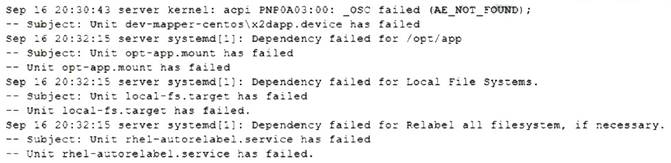
Which of the following will allow the administrator to boot the Linux system to normal mode quickly?
- A. Comment out the /opt/app filesystem in /etc/fstab and reboot.
- B. Reformat the /opt/app filesystem and reboot.
- C. Perform filesystem checks on local filesystems and reboot.
- D. Trigger a filesystem relabel and reboot.
Answer: A
Explanation:
The fastest way to boot the Linux system to normal mode is to comment out the /opt/app filesystem in /etc/fstab and reboot. This will prevent the system from trying to mount the /opt/app filesystem at boot time, which causes an error because the filesystem does not exist or is corrupted. Commenting out a line in /etc/fstab can be done by adding a # symbol at the beginning of the line. Rebooting the system will apply the changes and allow the system to boot normally. Reformatting the /opt/app filesystem will not help to boot the system, as it will erase any data on the filesystem and require manual intervention to create a new filesystem. Performing filesystem checks on local filesystems will not help to boot the system, as it will not fix the missing or corrupted /opt/app filesystem. Triggering a filesystem relabel will not help to boot the system, as it will only change the security context of files and directories according to SELinux policy. References: CompTIA Linux+ (XK0- 005) Certification Study Guide, Chapter 14: Managing Disk Storage, page 456.
NEW QUESTION 13
A Linux administrator is creating a new sudo profile for the accounting user. Which of the following should be added by the administrator to the sudo
configuration file so that the accounting user can run / opt/ acc/ report as root?
- A. accounting localhost=/opt/acc/report
- B. accounting ALL=/opt/acc/report
- C. %accounting ALL=(ALL) NOPASSWD: /opt/acc/report
- D. accounting /opt/acc/report= (ALL) NOPASSWD: ALL
Answer: C
Explanation:
This answer allows the accounting user to run the /opt/acc/report command as root on any host without entering a password. The % sign indicates that accounting is a group name, not a user name. The ALL keyword means any host, any user, and any command, depending on the context. The NOPASSWD tag overrides the default behavior of sudo, which is to ask for the user’s password.
The other answers are incorrect for the following reasons:
✑ A. accounting localhost=/opt/acc/report
✑ B. accounting ALL=/opt/acc/report
✑ D. accounting /opt/acc/report= (ALL) NOPASSWD: ALL
NEW QUESTION 14
An administrator has source code and needs to rebuild a kernel module. Which of the following command sequences is most commonly used to rebuild this
type of module?
- A. ./configure makemake install
- B. wget gcccp
- C. tar xvzf buildcp
- D. build install configure
Answer: A
Explanation:
The best command sequence to rebuild a kernel module from source code is A. ./configure make make install. This is the standard way to compile and install a Linux kernel module, as explained in the web search result 5. The other commands are either not relevant, not valid, or not sufficient for this task. For example:
✑ B. wget gcc cp will try to download, compile, and copy a file, but it does not specify the source code, the module name, or the destination directory.
✑ C. tar xvzf build cp will try to extract, build, and copy a compressed file, but it does not specify the file name, the module name, or the destination directory.
✑ D. build install configure will try to run three commands that are not defined or recognized by the Linux shell.
NEW QUESTION 15
Application code is stored in Git. Due to security concerns, the DevOps engineer does not want to keep a sensitive configuration file, app . conf, in the repository. Which of the following should the engineer do to prevent the file from being uploaded to the repository?
- A. Run git exclude ap
- B. conf.
- C. Run git stash ap
- D. conf.
- E. Add app . conf to . exclude.
- F. Add app . conf to . gitignore.
Answer: D
Explanation:
This will prevent the file app.conf from being tracked by Git and uploaded to the repository. The .gitignore file is a special file that contains patterns of files and directories that Git should ignore. Any file that matches a pattern in the .gitignore file will not be staged, committed, or pushed to the remote repository. The .gitignore file should be placed in the root directory of the repository and committed along with the other files.
The other options are incorrect because:
* A. Run git exclude app.conf
This is not a valid Git command. There is no such thing as git exclude. The closest thing is git update-index --assume-unchanged, which tells Git to temporarily ignore changes to a file, but it does not prevent the file from being uploaded to the repository.
* B. Run git stash app.conf
This will temporarily save the changes to the file app.conf in a stash, which is a hidden storage area for uncommitted changes. However, this does not prevent the file from being tracked by Git or uploaded to the repository. The file will still be part of the working tree and the index, and it will be restored when the stash is popped or applied.
* C. Add app.conf to .exclude
This will have no effect, because Git does not recognize a file named .exclude. The only files that Git uses to ignore files are .gitignore, $GIT_DIR/info/exclude, and core.excludesFile.
References:
✑ Git - gitignore Documentation
✑ .gitignore file - ignoring files in Git | Atlassian Git Tutorial
✑ Ignoring files - GitHub Docs
✑ [CompTIA Linux+ Certification Exam Objectives]
NEW QUESTION 16
......
Recommend!! Get the Full XK0-005 dumps in VCE and PDF From Dumps-hub.com, Welcome to Download: https://www.dumps-hub.com/XK0-005-dumps.html (New 389 Q&As Version)
- [2021-New] CompTIA SY0-401 Dumps With Update Exam Questions (171-180)
- [2021-New] CompTIA SK0-004 Dumps With Update Exam Questions (61-70)
- How Many Questions Of PK0-005 Preparation Exams
- Top Tips Of Updated SY0-601 Exam Prep
- [2021-New] CompTIA SK0-004 Dumps With Update Exam Questions (21-30)
- [2021-New] CompTIA CAS-002 Dumps With Update Exam Questions (2-11)
- Downloadable CompTIA CAS-003 Preparation Online
- What Printable N10-009 Test Engine Is
- [2021-New] CompTIA CAS-002 Dumps With Update Exam Questions (141-150)
- [2021-New] CompTIA SY0-401 Dumps With Update Exam Questions (51-60)